Cloud performance optimization is the ongoing practice of making cloud environments faster, leaner, and more reliable without paying for capacity the business does not need. It brings together technical tuning, cost visibility, governance, and automation so teams can support real application demand instead of guessing. Done well, cloud resource optimization helps organizations reduce cloud spend while keeping user experience, security, and scalability in focus.
How can you balance cloud performance and cloud cost?
The best way to balance performance and cost is to treat them as connected signals, not competing goals. A slow application can be expensive if it wastes compute cycles, retries failed requests, or overuses bandwidth; a cheap environment can also become costly if it creates outages or poor customer experiences. Effective cloud infrastructure optimization starts with measuring workload behavior, matching resources to real demand, and building feedback loops that adjust capacity before waste or bottlenecks become normal.
This is why optimizing cloud computing is not just a one-time cleanup project. Cloud usage changes as products grow, traffic shifts, teams launch experiments, and data volumes increase. A resource plan that worked last quarter may be too large, too small, or poorly placed today. The practical goal is to create an environment where performance data, cost data, and operational ownership guide decisions continuously.
Rightsizing is the foundation of cloud resource optimization
Rightsizing means matching cloud resources to what workloads actually require. It is often mistaken for downsizing, but the real purpose is appropriateness: some workloads need fewer resources, some need different instance families, and some need more capacity in a specific area to prevent latency or failures. The right decision depends on actual utilization patterns, not assumptions.
For example, a service with consistently low CPU usage but high memory pressure may not need a smaller instance; it may need a better-suited instance type. A batch process that runs only a few hours per day may not need always-on capacity. A customer-facing application with daily traffic spikes may benefit from elastic scaling instead of being provisioned for peak demand all day.
Useful rightsizing signals include:
- CPU utilization: Shows whether compute capacity is consistently overused, underused, or spiking unpredictably.
- Memory usage: Helps reveal hidden pressure that CPU metrics alone may miss.
- Disk I/O: Indicates whether storage read/write performance is limiting the workload.
- Network throughput and latency: Shows whether users or services are waiting on data movement.
- Error rates and response times: Connect infrastructure decisions to application health and user experience.
- Idle resource reports: Identify unattached volumes, unused load balancers, orphaned snapshots, and forgotten test environments.
The most effective teams review these metrics together. A cost-only review may cut resources too aggressively, while a performance-only review may keep oversized capacity in place. Cloud performance optimization works best when the discussion includes both efficiency and reliability.
Autoscaling turns demand changes into resource decisions
Autoscaling helps teams provision and remove capacity automatically based on demand. Instead of manually adding resources during a traffic surge or paying for peak capacity at all times, autoscaling policies can respond to usage thresholds, queue depth, request volume, or other workload-specific signals. This keeps applications responsive while reducing unnecessary spend during quiet periods.
Good autoscaling requires more than turning on a feature. Teams need to choose the right scaling metric, set sensible minimum and maximum capacity, and test how the application behaves during scale-out and scale-in events. If thresholds are too sensitive, the environment may scale constantly and create instability. If they are too slow, users may feel the impact before new resources are ready.
A practical autoscaling checklist includes:
- Define the performance target. Decide what response time, throughput, or queue length is acceptable for the service.
- Choose a meaningful trigger. CPU may work for compute-heavy services, while request count or queue depth may fit other workloads better.
- Set guardrails. Minimums protect availability; maximums prevent runaway scaling and unexpected costs.
- Test under realistic load. Simulated traffic helps reveal warm-up time, dependency limits, and scaling delays.
- Review scaling history. Frequent scaling events, missed spikes, or long periods at maximum capacity suggest the policy needs tuning.
Autoscaling is one of the clearest examples of how cloud optimization solutions can support both performance and savings. The value comes from using automation to align capacity with demand instead of relying on fixed estimates.
Smarter purchasing reduces waste without weakening performance
Not every workload should be paid for the same way. Stable, predictable services may fit long-term commitment models, while temporary or fault-tolerant tasks may benefit from discounted spare capacity. Choosing the right purchasing model is a major part of reducing waste, but it should follow workload analysis rather than lead it.
Reserved or committed-use options can make sense for steady workloads that are expected to run for a long period. They can reduce cloud spend when teams are confident about baseline demand, but they can also create waste if the business overcommits or the architecture changes. Spot-style capacity can be useful for jobs that can pause, retry, or move without affecting users, but it is not ideal for workloads that require uninterrupted availability.
A simple decision flow can help:
- Use on-demand capacity for new, unpredictable, or rapidly changing workloads.
- Consider reserved or committed capacity for stable baseline usage with clear ownership.
- Use discounted interruptible capacity for batch jobs, testing, rendering, analytics, and other fault-tolerant work.
- Revisit commitments regularly when applications are redesigned, migrated, or retired.
This approach keeps financial optimization connected to technical reality. The cheapest option on paper is not efficient if it creates operational risk, and the most flexible option may be unnecessarily expensive for predictable usage.
Which tools support continuous cloud performance optimization?
The most useful tools are the ones that connect visibility, alerting, automation, and accountability. Cloud-native platforms such as AWS CloudWatch, Azure Monitor, and Google Cloud Operations can help teams observe infrastructure and application behavior inside their chosen environments. Third-party monitoring and optimization platforms, including tools such as Datadog, New Relic, and AI-driven options, can provide broader visibility across hybrid or multi-cloud architectures.
Tooling matters because manual reviews do not scale well in complex environments. As teams deploy more services, containers, databases, storage buckets, and network components, it becomes harder to see where waste begins. Monitoring platforms can reveal trends, alert teams to anomalies, and provide recommendations for cloud resource optimization.
However, tools are only as useful as the decisions built around them. Dashboards that no one reviews and alerts that no one owns will not improve performance or cost. A strong tool strategy defines who responds, what thresholds matter, how recommendations are evaluated, and which changes can be automated safely.
Important capabilities to look for include:
- Unified views of cost, usage, and performance across accounts or teams.
- Resource tagging and ownership reporting.
- Anomaly detection for sudden cost or utilization changes.
- Rightsizing and idle resource recommendations.
- Alert routing that reaches the team responsible for action.
- Automation options with approval workflows or guardrails.
- Historical reporting to show whether changes improved results.
Automation is especially valuable for repetitive tasks such as shutting down non-production environments after hours, resizing resources based on patterns, or flagging unused assets. More advanced cloud optimisation efforts may use machine learning to identify trends humans would miss, but teams should still validate recommendations against performance, security, and business needs.
Governance prevents cloud sprawl from becoming normal
Cloud sprawl happens when resources multiply without consistent ownership, naming, tagging, lifecycle rules, or review. It often starts innocently: a team creates a test environment, a project changes direction, a storage volume is left behind, or multiple groups solve the same problem in different ways. Over time, these small decisions create higher bills, weaker visibility, and more operational complexity.
Governance does not have to mean slowing teams down. In healthy cloud environments, governance gives teams clear rules so they can move quickly without creating hidden risk. Tagging standards, budget alerts, approved service catalogs, environment lifecycle policies, and access controls all help make cloud infrastructure optimization sustainable.
A practical governance model should answer:
- Who owns each workload, environment, and monthly cost center?
- Which tags are required before resources can be deployed?
- How are temporary environments expired or reviewed?
- What spending thresholds trigger investigation?
- Which services require security or compliance approval?
- Who can approve exceptions, and how long do they last?
These questions make accountability visible. They also reduce the friction between engineering, finance, and operations because everyone can work from the same data.
FinOps connects teams around shared outcomes
FinOps is a collaborative operating model that brings finance, engineering, product, and operations together around cloud cost and value. Its purpose is not simply to cut budgets. It helps teams understand the cost of technical decisions, prioritize improvements, and make tradeoffs with shared context.
For organizations just starting, the first step is usually visibility. Teams need to know what they are spending, who owns it, and how that spend supports services or products. From there, they can create regular review cycles, define optimization goals, and decide which changes are worth engineering effort.
A lightweight starting plan might include:
- Establish tagging basics. Make ownership, application, environment, and cost center tags mandatory.
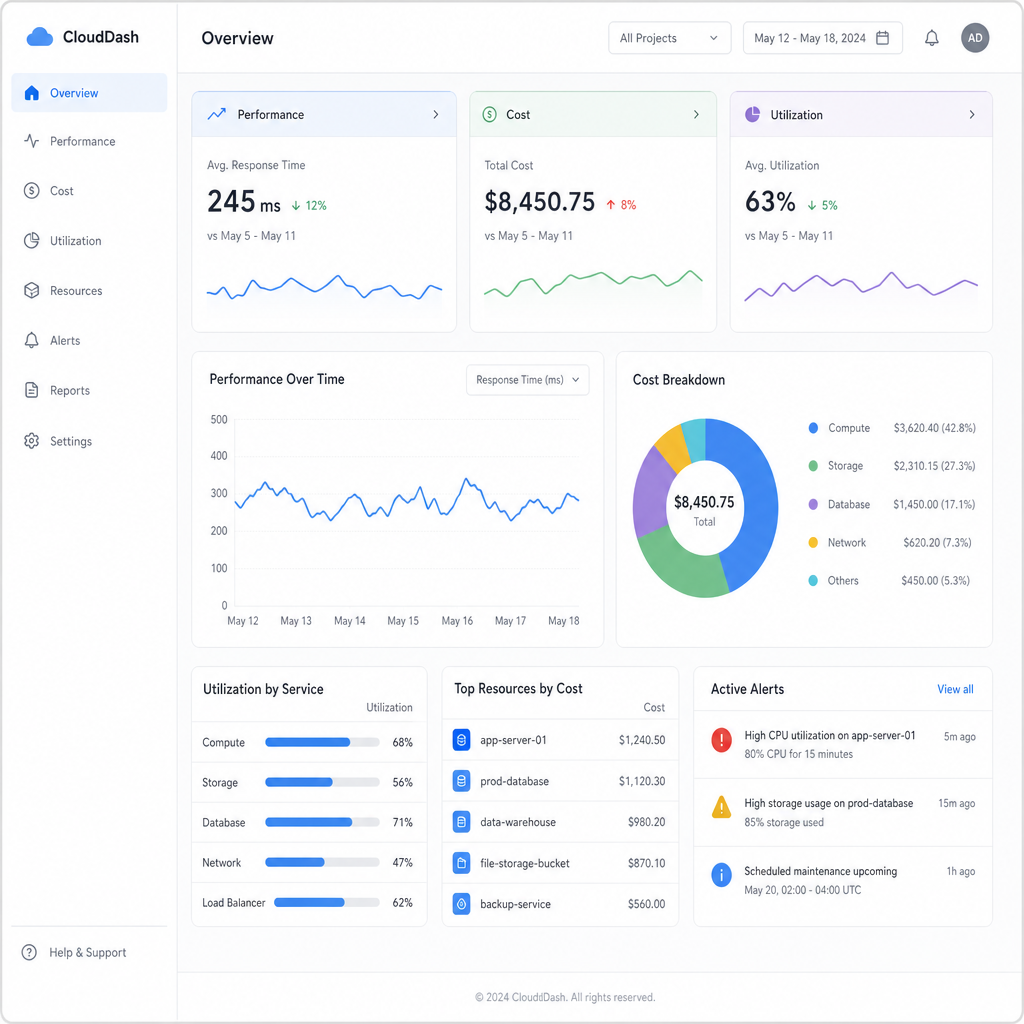
- Create shared dashboards. Show cost and performance together so decisions do not happen in silos.
- Schedule monthly optimization reviews. Focus on the highest-impact opportunities first.
- Assign action owners. Every recommendation should have a responsible team and due date.
- Celebrate avoided waste. Recognize teams that improve efficiency without harming reliability.
This culture matters because cloud optimization is never purely technical. Engineers understand architecture, finance understands budgets, and operations understands reliability. Bringing those perspectives together leads to better decisions than any group can make alone.
Security and compliance stay part of the optimization plan
Efficiency should not come at the expense of security, resilience, or compliance. Removing a redundant resource may be smart; removing a backup, audit trail, or protective control without understanding its purpose can create serious risk. The safest approach is to include security and compliance context in optimization workflows from the beginning.
Before deleting or resizing resources, teams should confirm ownership, dependency relationships, retention needs, and recovery requirements. Access permissions should be reviewed alongside cost controls, especially in environments where many teams can create infrastructure. Automation should also include safeguards, such as approval steps for production changes and exclusion rules for regulated workloads.
Cloud performance optimization is strongest when it improves the environment as a whole. The ideal outcome is not just a lower bill, but a cleaner, better-understood, more resilient cloud estate.
The takeaway
Maximizing efficiency in the cloud requires continuous attention to performance, cost, ownership, and risk. Rightsizing, autoscaling, smarter purchasing, monitoring, governance, and FinOps all contribute to a practical cloud resource optimization strategy. When these practices work together, teams can reduce cloud spend, improve reliability, and make cloud decisions with more confidence.
The most important step is to start with visibility. Once teams can see how resources are used, who owns them, and how they affect application performance, optimization becomes less reactive and more strategic. From there, cloud optimization solutions and automation can help sustain progress as environments grow more complex.
