Web server capacity planning is the process of estimating how much computing power, memory, storage, network bandwidth, and supporting infrastructure a website or application needs to stay fast and reliable as demand changes. It connects traffic forecasting, server performance metrics, infrastructure planning, and web server optimization so teams can scale before users feel slow pages, failed requests, or outages. Done well, it turns growth, seasonal spikes, product launches, and everyday usage into practical decisions about servers, cloud resources, caching, load balancing, and monitoring.
What does web server capacity planning mean?
Web server capacity planning means matching expected demand with the right amount of server resources, while leaving enough margin for sudden traffic changes and operational risk. It is not simply buying a bigger server or adding more cloud instances whenever performance drops. It is a repeatable planning process that uses real usage data, performance targets, and business expectations to decide when, where, and how to scale.
At its core, server capacity planning answers a practical question: can the current infrastructure handle the amount of traffic the business expects, at the level of speed and reliability users need? To answer that, teams look at traffic volume, request patterns, CPU and memory usage, database load, storage growth, bandwidth, application behavior, and the limits of the web server stack.
A capacity plan usually includes three views:
- Current capacity: What the system can handle today before performance degrades.
- Forecasted demand: How traffic, transactions, content, users, or data are expected to grow.
- Scaling strategy: What changes are needed to keep performance stable as demand increases.
This makes capacity planning both technical and strategic. A developer may focus on request latency or connection limits, while an operations team may focus on resource utilization, failover, and cost. A business owner may care most about keeping checkout, bookings, sign-ups, or lead forms available during peak demand. A useful plan connects all of those concerns instead of treating infrastructure as a background detail.
Why capacity planning matters for website performance
Capacity planning matters because web performance problems rarely appear evenly. A site may look healthy on a quiet weekday and then fail during a sale, product announcement, media mention, campaign launch, or seasonal rush. Without a plan, teams often discover the limit of their infrastructure at the worst possible moment: when the most users are trying to reach them.
Poor capacity planning can lead to slow page loads, timeouts, failed logins, abandoned carts, broken forms, overloaded databases, and emergency infrastructure spending. Even when the site stays online, degraded performance can hurt user trust. People may not know whether the problem is CPU saturation, memory pressure, or a backend bottleneck; they only know the site feels unreliable.
Strong infrastructure planning helps prevent that. It gives teams a way to prepare for growth before it becomes a crisis. It also helps avoid overprovisioning, where a business pays for far more server capacity than it actually needs. The best plan balances reliability, performance, and cost instead of optimizing one at the expense of the others.
Capacity planning also supports better collaboration. Marketing can share campaign calendars. Product teams can flag launches or feature changes. Engineering can explain technical limits. Operations can prepare scaling rules and response plans. When everyone has a shared view of expected demand, performance scaling becomes intentional rather than reactive.
The main inputs of server capacity planning
A capacity plan is only as good as the information behind it. Guesswork can be useful at the very beginning of a project, but mature planning depends on measurements, forecasts, and clearly defined service expectations.
Traffic patterns and user behavior
Traffic forecasting starts with understanding how people actually use the website or application. Total monthly visits are useful, but they are not enough. A site with modest monthly traffic may still face sharp bursts during business hours, live events, email campaigns, or limited-time offers.
Useful traffic inputs include:
- Average and peak visits per hour
- Requests per second during normal and busy periods
- Ratio of anonymous users to logged-in users
- Number of pages, API calls, or assets loaded per visit
- Geographic distribution of visitors
- Device mix and connection quality
- Campaigns, launches, or events expected to change demand
The goal is to understand not just how many users arrive, but what they do when they arrive. A user reading a cached article may create very little backend load. A user searching inventory, uploading files, joining a live dashboard, or checking out may create much more work for the server.
Application workload
Two websites with the same traffic can require very different server capacity. A mostly static site may scale easily with caching and a content delivery network. A dynamic application that generates personalized pages, runs complex queries, processes payments, or serves real-time data needs more careful planning.
Workload analysis looks at what each request requires from the system. Some requests are simple and fast. Others consume CPU, memory, disk I/O, database connections, external API calls, or queue workers. Identifying the heaviest paths helps teams decide whether the problem is the web server, application code, database, cache layer, file storage, or network.
Performance targets
Capacity planning needs a definition of “good enough.” Without targets, teams may not know whether to scale, optimize, or accept current performance. Performance targets can include response time, page load time, uptime goals, error rates, throughput, and recovery expectations.
For example, an internal reporting tool may tolerate slower response times than a public checkout page. A marketing landing page may need to handle short traffic bursts smoothly. A SaaS dashboard may need consistent performance throughout the workday. The right capacity plan reflects the actual importance and usage pattern of each part of the system.
Current infrastructure limits
Every system has limits. Capacity planning identifies those limits before they become user-facing problems. That means understanding the web server configuration, application runtime, database capacity, network bandwidth, storage performance, caching strategy, background jobs, and third-party dependencies.
This is where server performance metrics become essential. They show whether the system is close to saturation, which resource is under pressure, and whether scaling will actually solve the problem.
How does capacity planning work?
Capacity planning works by measuring current performance, estimating future demand, testing system limits, and creating a scaling plan that keeps the service within acceptable performance targets. The process is continuous because traffic, software, infrastructure, and business priorities all change over time. A one-time plan may help with a launch, but ongoing planning is what keeps performance stable as the system evolves.
A practical capacity planning workflow usually follows these steps:
- Define the service goal. Decide what level of speed, availability, and error tolerance the site or application should maintain.
- Collect baseline metrics. Measure current traffic, resource usage, latency, throughput, and error rates during normal and peak periods.
- Identify bottlenecks. Determine which part of the stack reaches its limit first under load.
- Forecast demand. Estimate future traffic using historical trends, business plans, campaign schedules, and expected user growth.
- Test capacity. Use load testing or stress testing to see how the system behaves as demand increases.
- Plan scaling actions. Decide whether to optimize code, tune configuration, add caching, scale vertically, scale horizontally, or redesign part of the architecture.
- Monitor and review. Keep measuring performance and update the plan as real-world usage changes.
This process prevents teams from treating every performance issue the same way. Sometimes the right answer is more servers. Sometimes it is better database indexing, smaller responses, improved caching, queue processing, or a configuration change. Capacity planning helps separate symptoms from causes.
Core server performance metrics to monitor
The most useful server performance metrics are the ones that connect infrastructure health to user experience. CPU usage alone does not explain whether customers are waiting too long. Page load time alone does not reveal which backend resource is constrained. A balanced monitoring setup tracks both system-level and application-level signals.
| Metric | What it shows | Why it matters |
|---|---|---|
| CPU utilization | How much processing capacity is being used | Sustained high CPU can indicate saturation, inefficient code, or insufficient compute power |
| Memory usage | How much RAM is available or consumed | Memory pressure can cause slowdowns, crashes, swapping, or failed processes |
| Disk I/O | How quickly data is read and written | Slow storage can affect logs, uploads, databases, queues, and cached files |
| Network throughput | Data moving in and out of the server | Bandwidth constraints can slow asset delivery and API responses |
| Requests per second | How many requests the server handles | Helps establish normal load and peak demand |
| Response time | How long requests take to complete | Directly affects perceived speed and user experience |
| Error rate | Percentage of failed requests | Indicates reliability problems under normal or peak load |
| Connection count | Active or waiting connections | Helps reveal web server limits and concurrency pressure |
| Database query time | Time spent retrieving or updating data | Often exposes backend bottlenecks that server scaling alone will not fix |
| Queue depth | Number of background jobs waiting | Shows whether asynchronous work is falling behind |
These metrics are most useful when viewed together. For example, rising response time with low CPU may point to database latency, third-party APIs, lock contention, or network delays. High CPU with low traffic may suggest inefficient code, bots, background jobs, or a misconfigured service. High memory usage may be normal for some systems and dangerous for others, depending on how the application manages resources.
The key is to establish a baseline. Once a team knows what normal looks like, unusual behavior becomes easier to detect. Baselines also make traffic forecasting more reliable because planners can connect a known amount of traffic with a known amount of resource consumption.
Traffic forecasting turns growth into infrastructure decisions
Traffic forecasting is the planning bridge between business activity and server resources. It estimates future demand so the infrastructure can be prepared before the demand arrives. Forecasting does not need to be perfect to be useful; it needs to be realistic enough to guide decisions and flexible enough to adjust when assumptions change.
Historical data is usually the starting point. Teams look at daily, weekly, monthly, and seasonal patterns. They compare quiet periods with peak periods. They study how traffic changed after campaigns, promotions, press coverage, feature releases, or search visibility gains. This helps separate ordinary growth from temporary spikes.
Forecasting should include both average and peak traffic. Average traffic helps with cost planning, while peak traffic helps with reliability planning. A site that averages 500 users per hour but spikes to 10,000 during an event needs a plan for the spike, not just the average.
Useful forecasting questions include:
- What is the highest traffic the site has handled successfully?
- What traffic level caused slowdowns, errors, or manual intervention?
- Are future campaigns expected to send traffic all at once or gradually?
- Will new features increase server work per user?
- Are there predictable busy seasons, renewal periods, or launch windows?
- How much safety margin is needed if forecasts are wrong?
Forecasting also needs business context. Marketing may know about upcoming campaigns. Sales may know about enterprise customers onboarding soon. Product teams may know that a new feature will create heavier API usage. Finance may have cost limits. A capacity plan becomes stronger when it includes these inputs early.
Capacity testing validates assumptions
Forecasts are estimates. Testing shows how the system actually behaves. Capacity testing helps teams measure current limits, validate scaling plans, and discover bottlenecks before real users encounter them.
Common testing approaches include:
- Load testing: Simulates expected traffic to verify that the system performs acceptably under normal or planned demand.
- Stress testing: Pushes the system beyond expected demand to find the breaking point.
- Spike testing: Sends traffic suddenly to see how the system handles abrupt surges.
- Soak testing: Runs sustained load over time to reveal memory leaks, queue buildup, resource exhaustion, or slow degradation.
- Failover testing: Checks whether redundant systems work when part of the infrastructure fails.
Good tests reflect real user behavior. A test that only hits the homepage may not reveal problems in search, checkout, authentication, file upload, or reporting. A realistic scenario includes the most important user journeys and the requests that are most expensive for the system to process.
Testing should also measure recovery. It is useful to know when the system slows down, but it is equally important to know whether it recovers automatically after traffic drops. Some systems remain unstable after a spike because queues, caches, database locks, or failed processes need time or manual intervention to normalize.
Scaling strategies for web server capacity
Performance scaling can happen in several ways. The right approach depends on the application, traffic pattern, budget, and bottleneck. Adding infrastructure before optimizing obvious inefficiencies can waste money, while optimizing endlessly instead of scaling can leave the site fragile.
Vertical scaling
Vertical scaling means increasing the resources of an existing server, such as adding more CPU, memory, or faster storage. It is often straightforward and can be effective when the application is not designed for multiple servers.
The limitation is that a single server can only grow so far. It may also remain a single point of failure. Vertical scaling can be a useful short-term move, but many growing applications eventually need horizontal scaling or architectural improvements.
Horizontal scaling
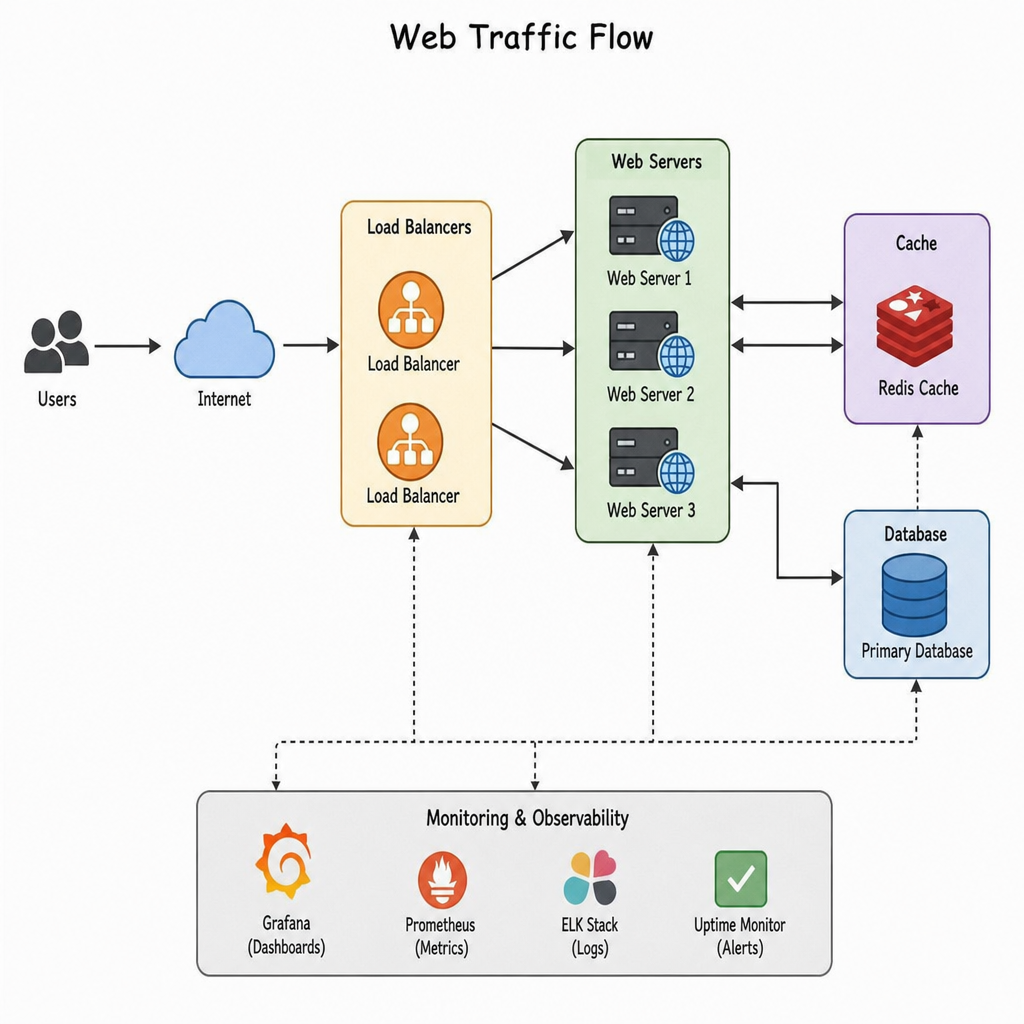
Horizontal scaling means adding more servers or instances and distributing traffic across them. This usually requires a load balancer, shared or externalized session management, coordinated deployments, centralized logging, and careful handling of files, caches, and background jobs.
Horizontal scaling can improve both capacity and resilience, but it adds operational complexity. Applications need to be designed so that any server can handle a request without depending on local state that other servers cannot access.
Caching and content delivery
Caching is one of the most effective forms of web server optimization. It reduces repeated work by storing responses, data, assets, or computed results so the system does not recreate them for every request. A content delivery network can move static assets closer to users and reduce load on the origin server.
Caching works best when teams understand what can safely be reused and for how long. Public static assets are usually easy to cache. Personalized pages, inventory, pricing, or authenticated content require more care. Poor cache rules can serve stale or incorrect content, while no caching at all can create unnecessary load.
Application and database optimization
Sometimes the server appears underpowered because the application is inefficient. Slow queries, missing indexes, oversized responses, blocking operations, unnecessary API calls, and poorly managed background jobs can all reduce capacity. In those cases, adding servers may hide the problem temporarily without fixing the root cause.
Optimization improves how much useful work each server can do. It can also delay infrastructure costs and make future scaling more predictable.
Capacity planning tools and what they help with
Capacity planning tools help teams collect data, model demand, test performance, and automate scaling decisions. The best toolset depends on the infrastructure and application stack, but most teams need visibility across monitoring, logging, testing, forecasting, and configuration.
Common tool categories include:
- Monitoring platforms for CPU, memory, disk, network, uptime, latency, and error rates.
- Application performance monitoring tools for tracing requests, identifying slow code paths, and measuring dependencies.
- Log analysis tools for investigating errors, traffic patterns, bots, and unusual behavior.
- Load testing tools for simulating traffic and validating capacity assumptions.
- Cloud cost and usage tools for understanding resource spend and utilization.
- Autoscaling tools for adding or removing capacity based on defined signals.
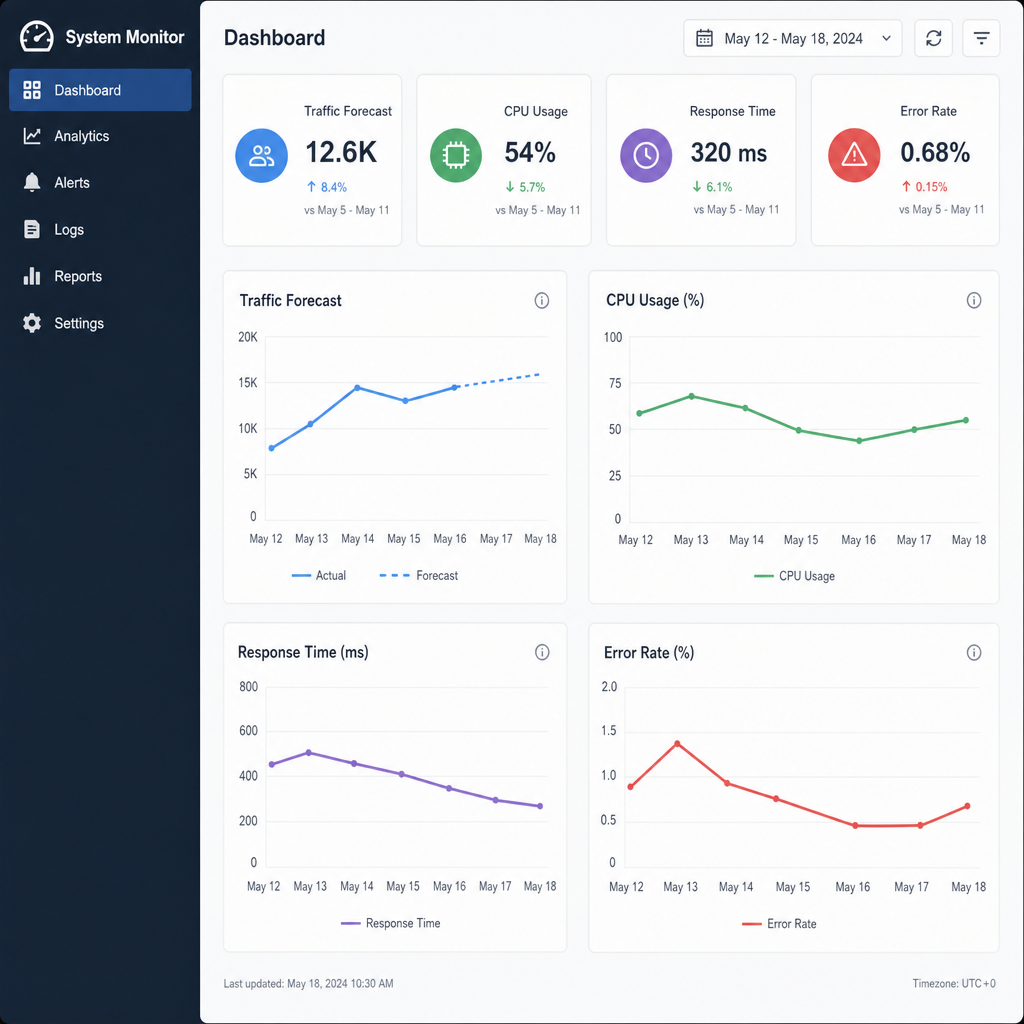
- Dashboards and alerting tools for making performance changes visible in real time.
Tools should support decisions, not replace judgment. A dashboard can show rising response times, but the team still needs to understand whether the cause is traffic growth, a code release, a database issue, a third-party service, or abusive traffic. The value of capacity planning tools comes from combining their data with operational knowledge.
A practical capacity planning checklist
A checklist keeps the process grounded. It helps teams move from broad concern to specific action and makes planning easier to repeat before launches, campaigns, migrations, or growth periods.
Use this checklist as a starting point:
- Define critical user journeys. Identify the pages, APIs, forms, transactions, and workflows that must stay fast and reliable.
- Set performance targets. Decide acceptable response times, error rates, uptime expectations, and recovery goals.
- Measure current usage. Capture traffic, throughput, resource consumption, latency, and errors during normal and peak periods.
- Map the architecture. Document web servers, databases, caches, queues, storage, load balancers, CDNs, third-party services, and deployment dependencies.
- Find current bottlenecks. Use monitoring and testing to identify which component reaches a limit first.
- Forecast demand. Include organic growth, seasonality, campaigns, launches, customer onboarding, and possible spikes.
- Run realistic load tests. Simulate important user journeys rather than only simple page requests.
- Choose scaling actions. Combine optimization, caching, vertical scaling, horizontal scaling, and configuration changes as needed.
- Plan rollback and recovery. Know how to respond if a release, traffic spike, or infrastructure change causes instability.
- Review regularly. Update the plan when traffic patterns, application behavior, or business priorities change.
This checklist should not live only in a document. It should connect to monitoring dashboards, deployment planning, campaign calendars, and incident response. Capacity planning becomes more useful when it is part of normal operations rather than a one-time exercise before a crisis.
Common mistakes to avoid
One common mistake is planning only for average traffic. Average numbers make infrastructure look calmer than it really is. Web servers fail during peaks, bursts, and unusual workloads, so the plan must account for demand concentration, not just total volume.
Another mistake is scaling the wrong layer. If the database is the bottleneck, adding more web servers may increase pressure and make the system worse. If external API calls are slow, more CPU may not help. Capacity planning should identify the constraint before choosing the solution.
Teams also run into trouble when they ignore non-production differences. A load test against a simplified staging environment may not reveal production limits. If staging has smaller data sets, different caching, fewer integrations, or weaker infrastructure, results need to be interpreted carefully.
Other avoidable mistakes include:
- Waiting for users to report performance problems before investigating.
- Treating autoscaling as a complete strategy instead of one part of the plan.
- Forgetting background jobs, scheduled tasks, search indexing, or reporting workloads.
- Failing to monitor error rates alongside response times.
- Overlooking bot traffic, crawlers, abusive requests, and scraping.
- Not reviewing capacity after major code changes or infrastructure migrations.
- Assuming cloud resources remove the need for infrastructure planning.
The pattern behind most mistakes is the same: teams make assumptions without validating them. Regular measurement and testing reduce that risk.
How to build a simple capacity plan
A simple capacity plan does not need to be complicated. It should clearly explain the current state, expected demand, known risks, and planned actions. The format can be a document, spreadsheet, dashboard, or runbook, as long as it is easy for the team to understand and update.
Start with a baseline section. Record current traffic, peak load, average response time, error rate, CPU, memory, database performance, cache hit rate, and any known limits. Include notes about recent incidents or slow periods so the numbers have context.
Next, add a forecast section. Estimate demand over the next relevant period, such as the next campaign, quarter, season, or launch window. Include best-case, expected, and high-demand scenarios if uncertainty is high. The purpose is not to predict perfectly; it is to prepare intelligently.
Then document the capacity gap. Compare expected demand with current measured capacity. If the system can already handle the forecasted load with a healthy margin, the plan may focus on monitoring and readiness. If the gap is large, identify the specific improvements needed.
Finally, assign actions. A useful plan names what will be changed, who owns it, when it should happen, and how success will be measured. Examples might include adding cache rules, increasing instance size, creating autoscaling policies, tuning database indexes, updating web server limits, reducing asset weight, or running another load test.
Capacity planning supports reliable growth
Web server capacity planning is not just an infrastructure exercise. It is a way to protect user experience while making growth more predictable. When teams understand demand, measure system behavior, and test their assumptions, they can make better decisions about performance scaling and web server optimization.
The strongest plans stay practical. They define performance goals, track the right metrics, forecast likely traffic, test real workloads, and choose scaling strategies based on evidence. They also leave room for uncertainty, because traffic does not always follow the plan.
For any website or application expected to grow, capacity planning should become part of regular operations. It helps teams avoid emergencies, control infrastructure costs, and give users a faster, more reliable experience when demand matters most.
